The Ember Web client portal

Your website, hours, invoices and support. One login.

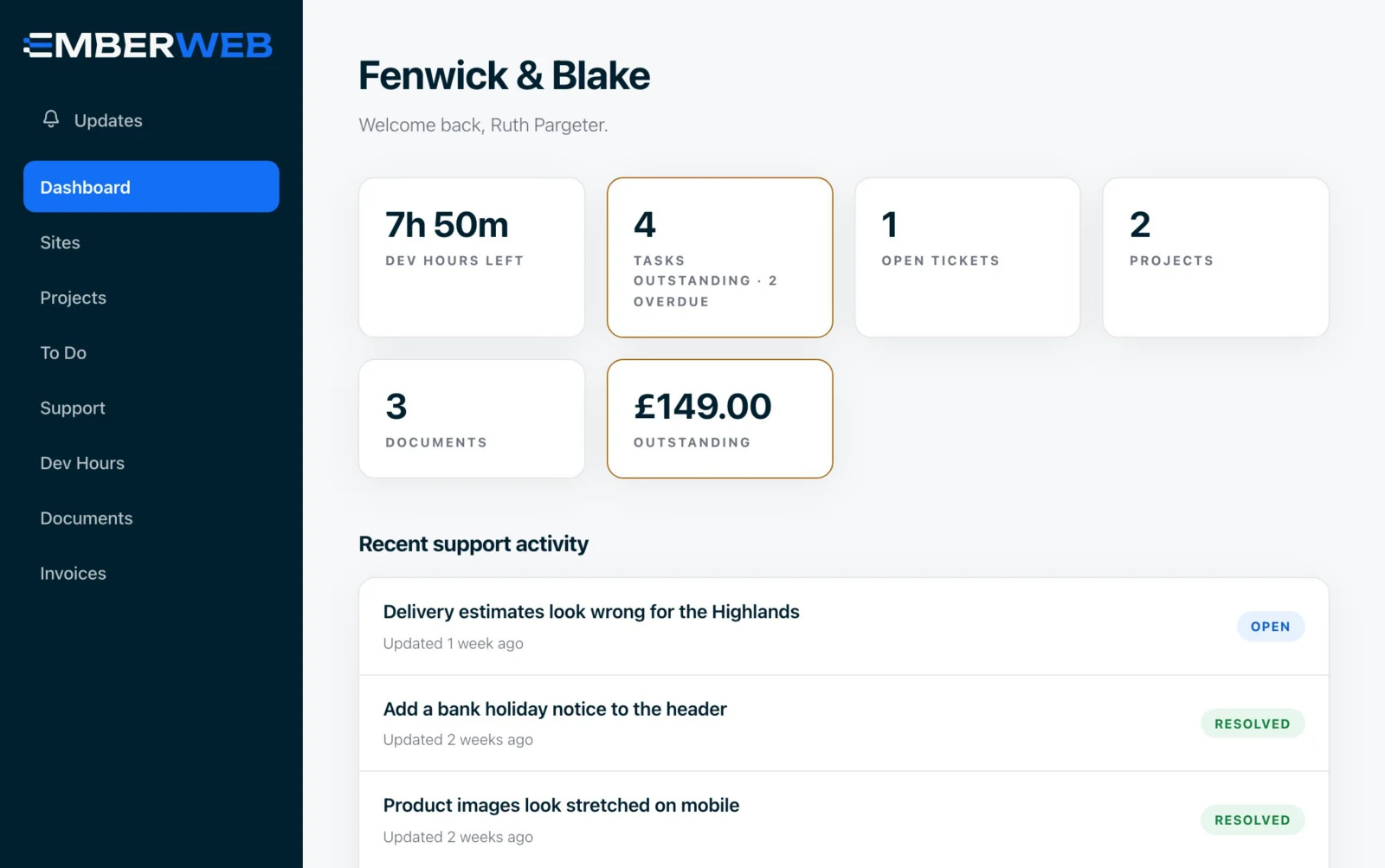
Every Ember Web client gets a private portal, built by us. See the hours you have left, what we worked on, every invoice, every support conversation and every monthly report, without chasing a single email.

Included with every support plan. No extra cost, nothing to install.

  • Private to your company
  • Card details handled by Stripe
  • Invite your whole team
Your website, hours, invoices and support. One login.
Why it matters

No more "can you just send me..." emails.

Most agencies keep the useful stuff in their own systems and drip it out when you ask. We give you the keys.

Typical agency

  • Hours used? You'll have to ask
  • Invoices buried somewhere in your inbox
  • Support lost in long email threads
  • Changing plan means a phone call
  • Reports arrive as a PDF, if at all
  • No idea who looks after the domain or email
The Ember standard

Ember Web portal

  • Live dev hours - itemised, task by task
  • Every invoice - paid, due and outstanding
  • Threaded support - with screenshots and replies
  • Plan changes - request an upgrade, pause or cancel
  • Monthly reports - shared the moment they're ready
  • Services and renewals - who does what, and when it's due
Inside the portal

Everything you would normally have to chase, already waiting for you.

These are real screens from the portal, shown with our demo company. Your own account looks exactly the same, just with your sites in it.

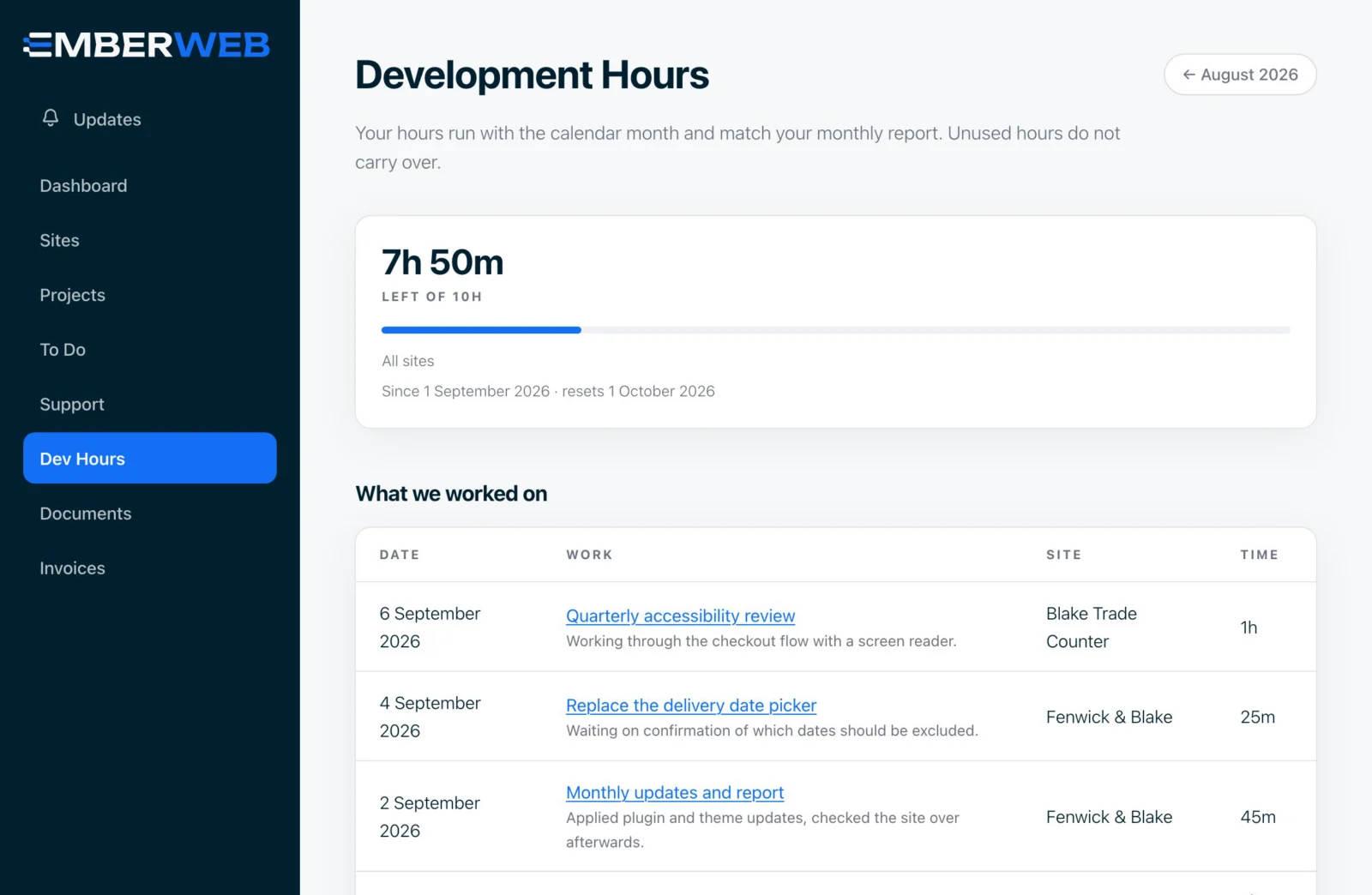
Know exactly how much time you have left.
Dev hours

Know exactly how much time you have left.

Your monthly development hours sit on a live counter. Every task we log shows what we did, which site it was for and how long it took, so there are never any surprises at the end of the month.

  • Hours remaining, updated as we work
  • An itemised log: date, task, site and time
  • Flip back through previous months
  • Work outside your plan is flagged before it's billed
Upgrade, pause or cancel without picking up the phone.
Plans and billing

Upgrade, pause or cancel without picking up the phone.

See what you pay today and ask for a change in a couple of clicks: move plan, cover more sites, pause or cancel. We confirm the cost with you first. Nothing is charged or cancelled until we have spoken.

  • Your current plans and what they cost
  • Request an upgrade or cover more sites
  • Ask to pause or cancel, no awkward calls
  • Update your card and billing details through Stripe
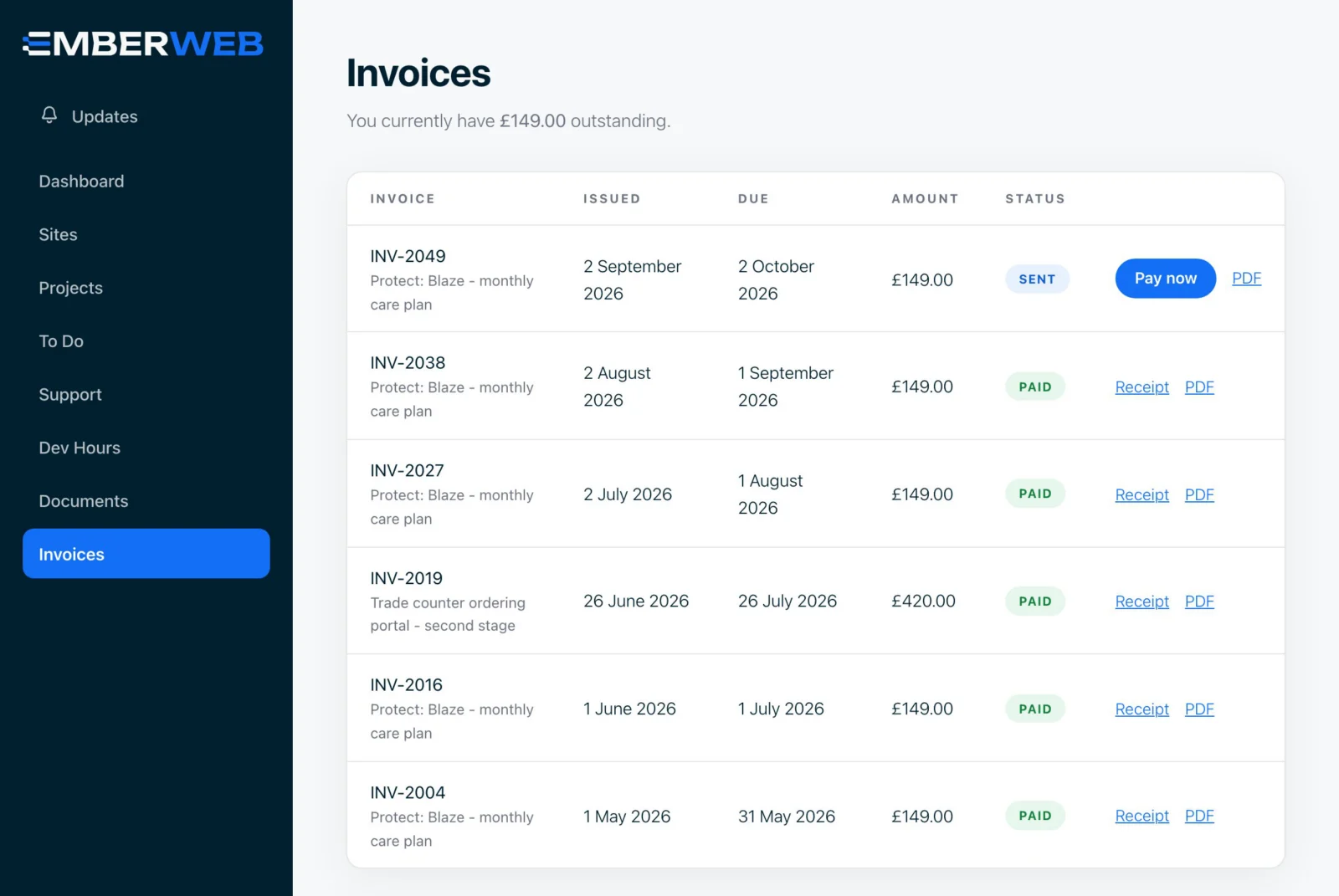
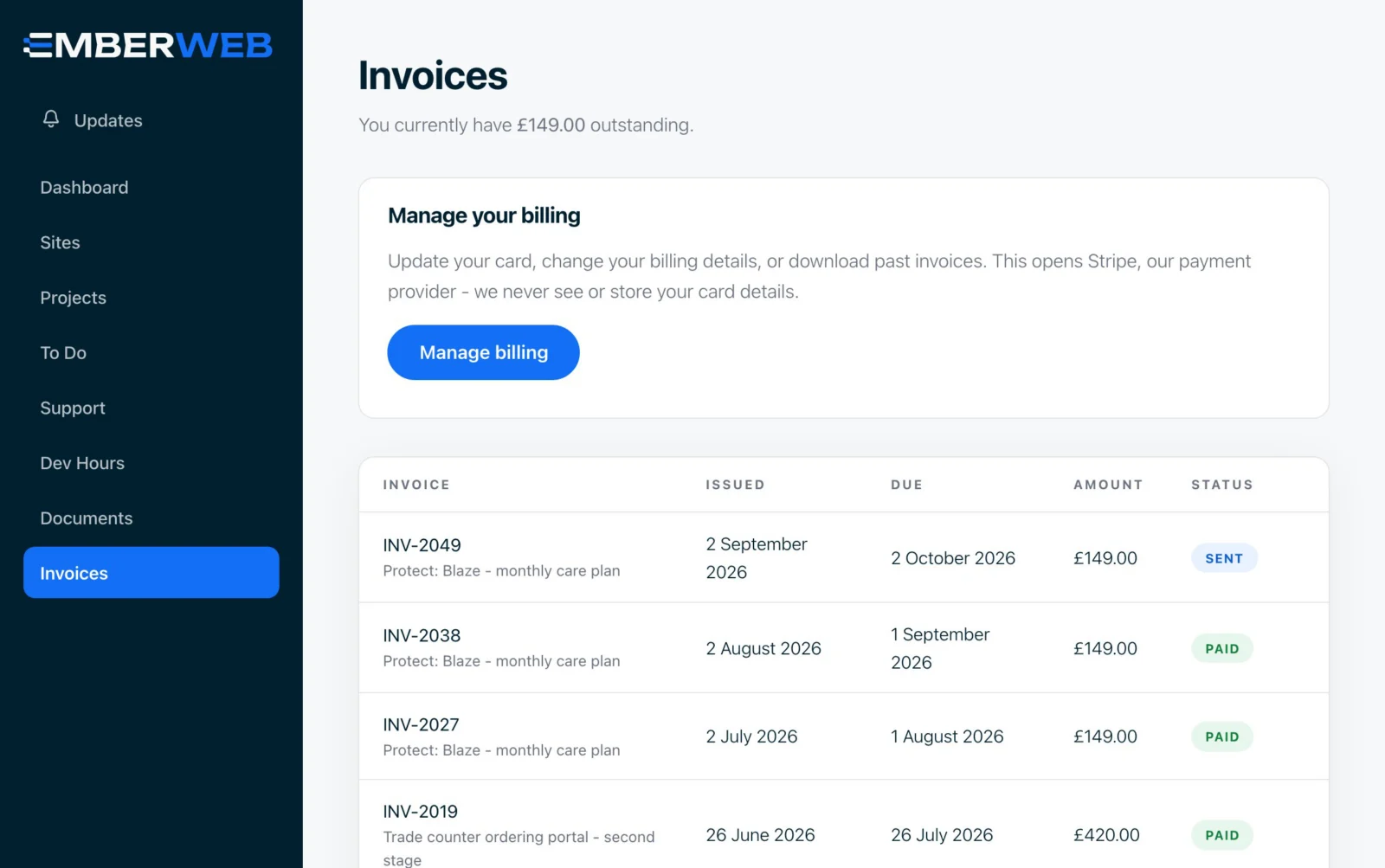
Every invoice, paid or due, in one list.
Invoices

Every invoice, paid or due, in one list.

No more digging through your inbox at year end. Every invoice we raise appears in the portal with its status, and you can pay anything outstanding or grab a receipt straight away.

  • Outstanding balance at a glance
  • Pay now, securely, by card
  • Receipts for everything you have paid
  • Clear descriptions, so your accounts team knows what's what
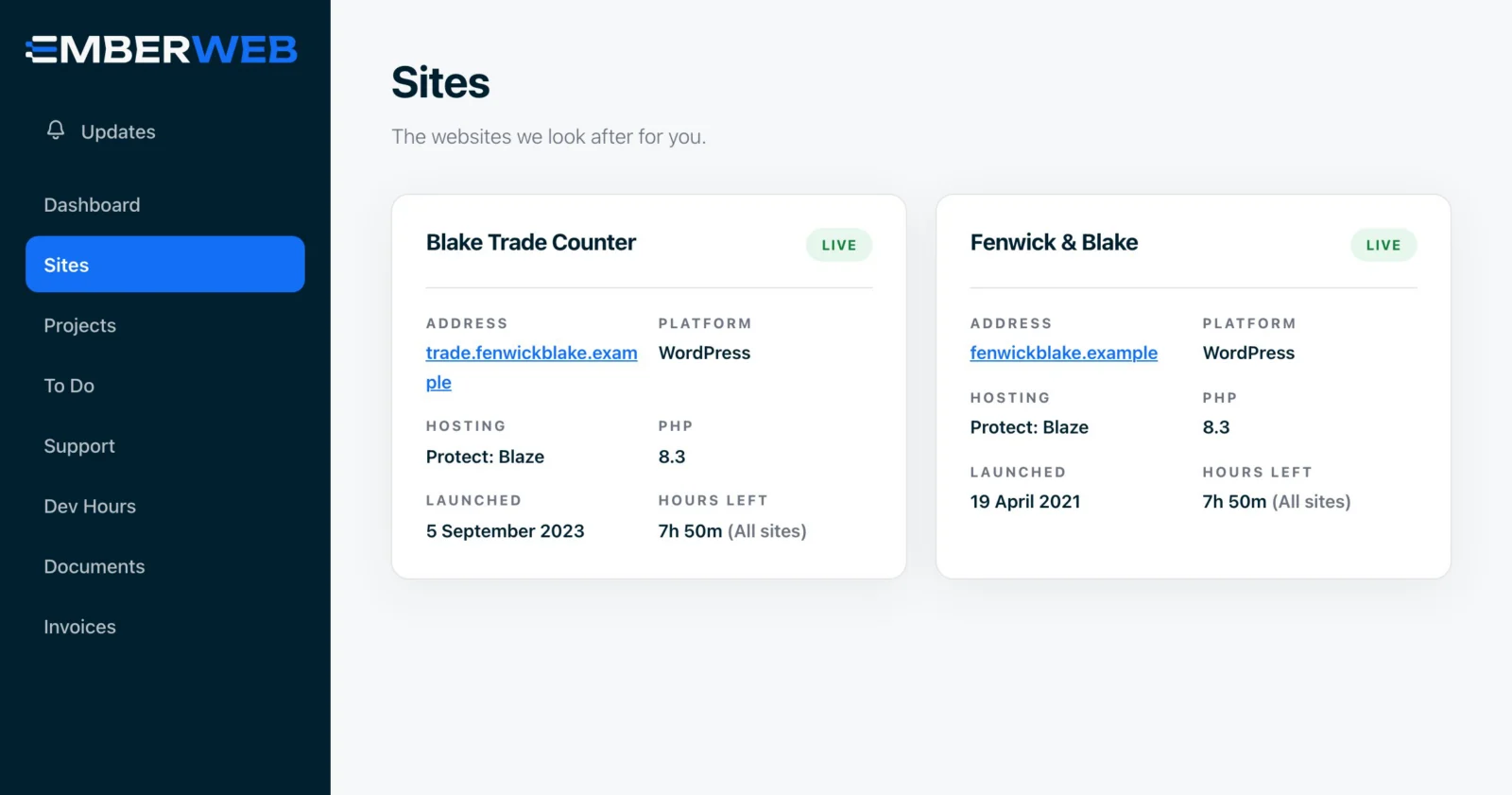
Add a new site in under a minute.
Your sites

Add a new site in under a minute.

Launching a new website or picked up another brand? Tell us about it, choose a plan and see the cost before you send anything. We check it over, confirm with you and add it to your account.

  • Every site you have with us, and the plan it's on
  • Request cover for another site
  • See the cost before you send the request
  • Nothing is charged until we confirm it with you
Private by design

Built so your data only ever reaches your team.

The portal holds invoices, reports and conversations about your business. We built it to be as careful with that as we are with your website.

01

Walled off by company

Every page, file and download is checked against your company before it is shown. Nobody outside your team can reach your account.

02

Files kept out of reach

Reports and documents are stored privately, outside the public web, and only handed to people signed in to your account.

03

We never see your card

Payments and card details are handled by Stripe. Your card number never touches our servers.

04

You control who is in

Invite colleagues, choose whether they can see invoices, and remove access yourself at any time. Nobody sees anyone else's password.

Support and reporting

Conversations, notes and reports, all in context.

Everything about your website lives in one place, so nothing gets lost when someone is on holiday or an email goes to spam.

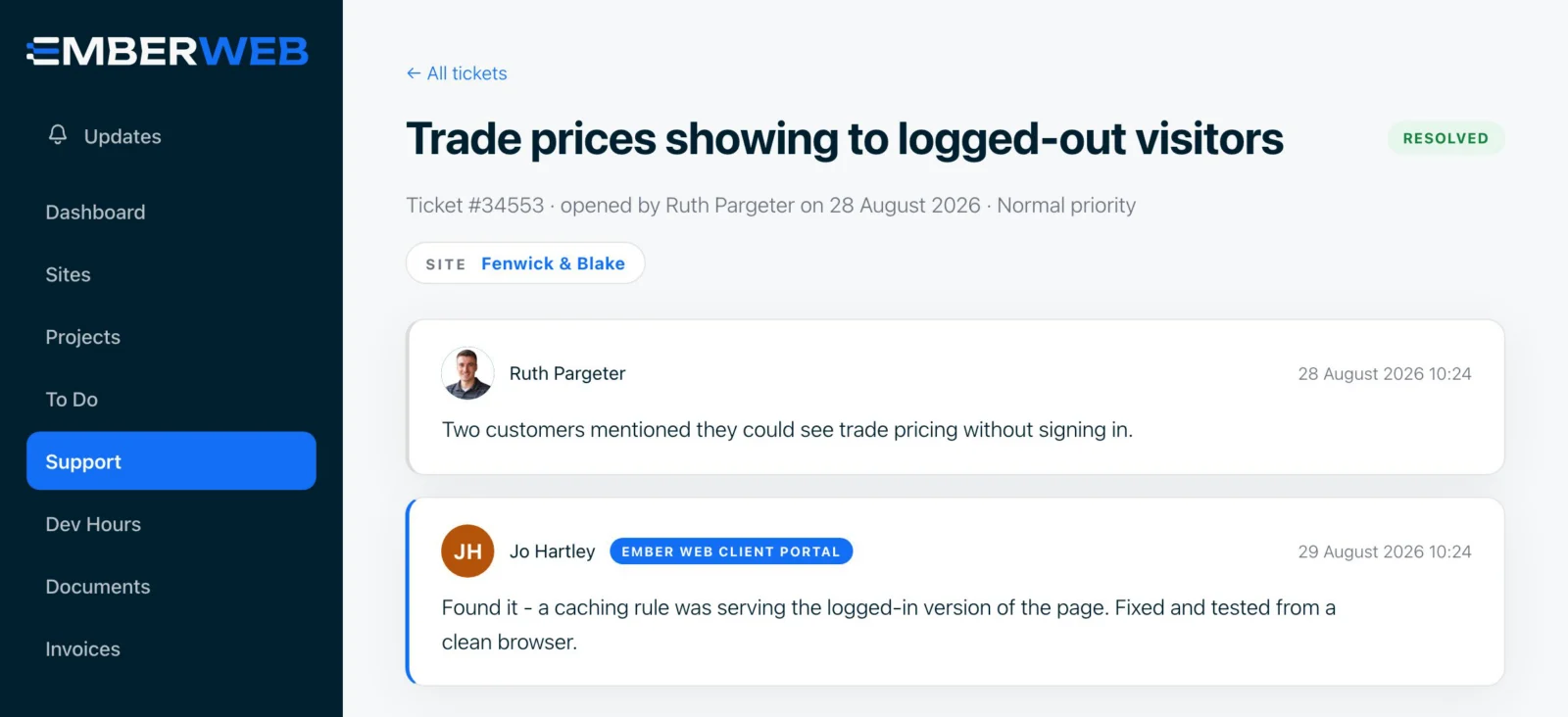
Raise a ticket, reply and see it through.
Support tickets

Raise a ticket, reply and see it through.

Every request is a threaded conversation linked to the right site. Add screenshots, reply whenever it suits you, and we are emailed the moment you post. When it is sorted, mark it resolved. If it comes back, reopen it.

  • Threaded replies from you and our team
  • Attach screenshots to show us the problem
  • Mark as resolved, or reopen if it comes back
  • The full history stays on your account
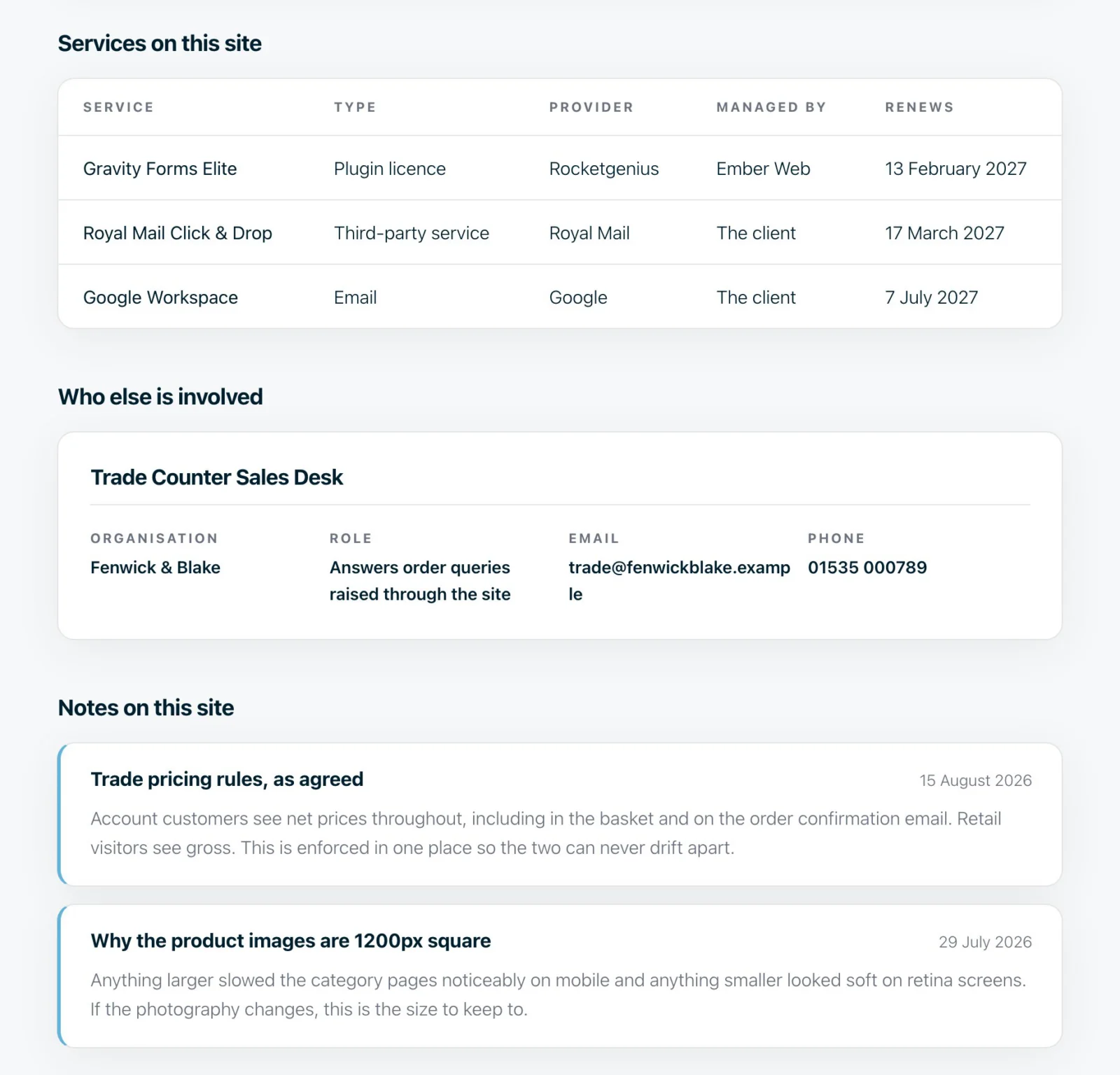
Who looks after what, and when it renews.
Site notes and services

Who looks after what, and when it renews.

Each site has its own page with the services attached to it, renewal dates, the other people involved (your host, your email provider, your SEO agency) and notes we keep about how it all fits together.

  • Licences, domains and services with renewal dates
  • Other suppliers involved with the site
  • Notes on how your site is set up
  • Open projects and tickets for that site
A plain-English report every month.
Monthly reports

A plain-English report every month.

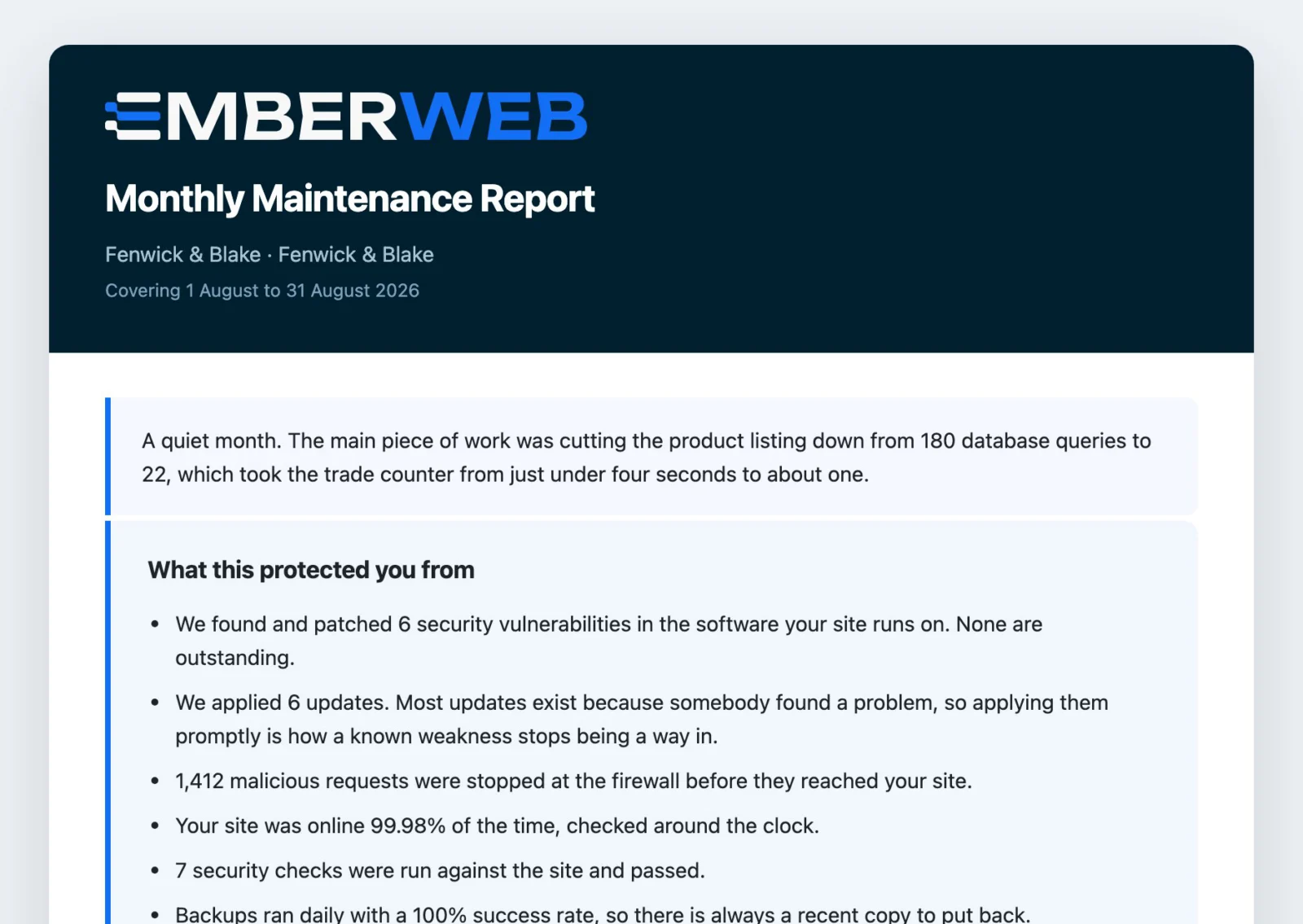
Each month we share a report for every site: updates applied, uptime, security, backups, site health, support and the dev hours used. It lands in your documents and you get a notification when it is ready.

  • What we protected you from this month
  • Uptime, backups and security checks
  • Support and development time, itemised
  • Stored privately, with a record of who has read it
See what is in progress, and what we need from you.
To do

See what is in progress, and what we need from you.

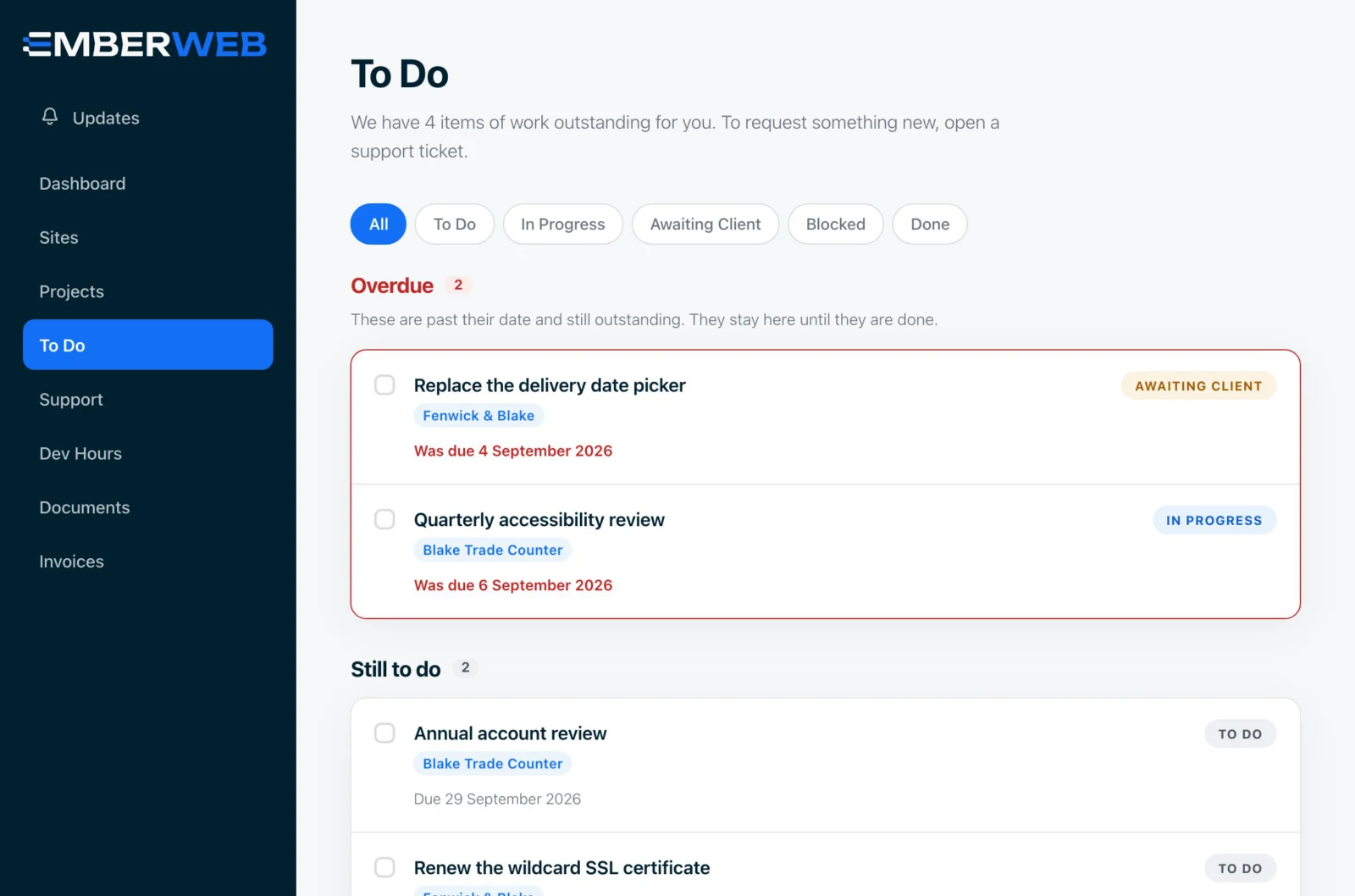
Every piece of work has a status. You can see what is in progress, what is blocked and what is waiting on you, so a project never stalls because a question got missed.

  • Overdue, still to do and completed
  • Filter by in progress, awaiting you or blocked
  • Due dates for every task
  • Linked to the site and project it belongs to
We even show you how to leave.
No lock-in

We even show you how to leave.

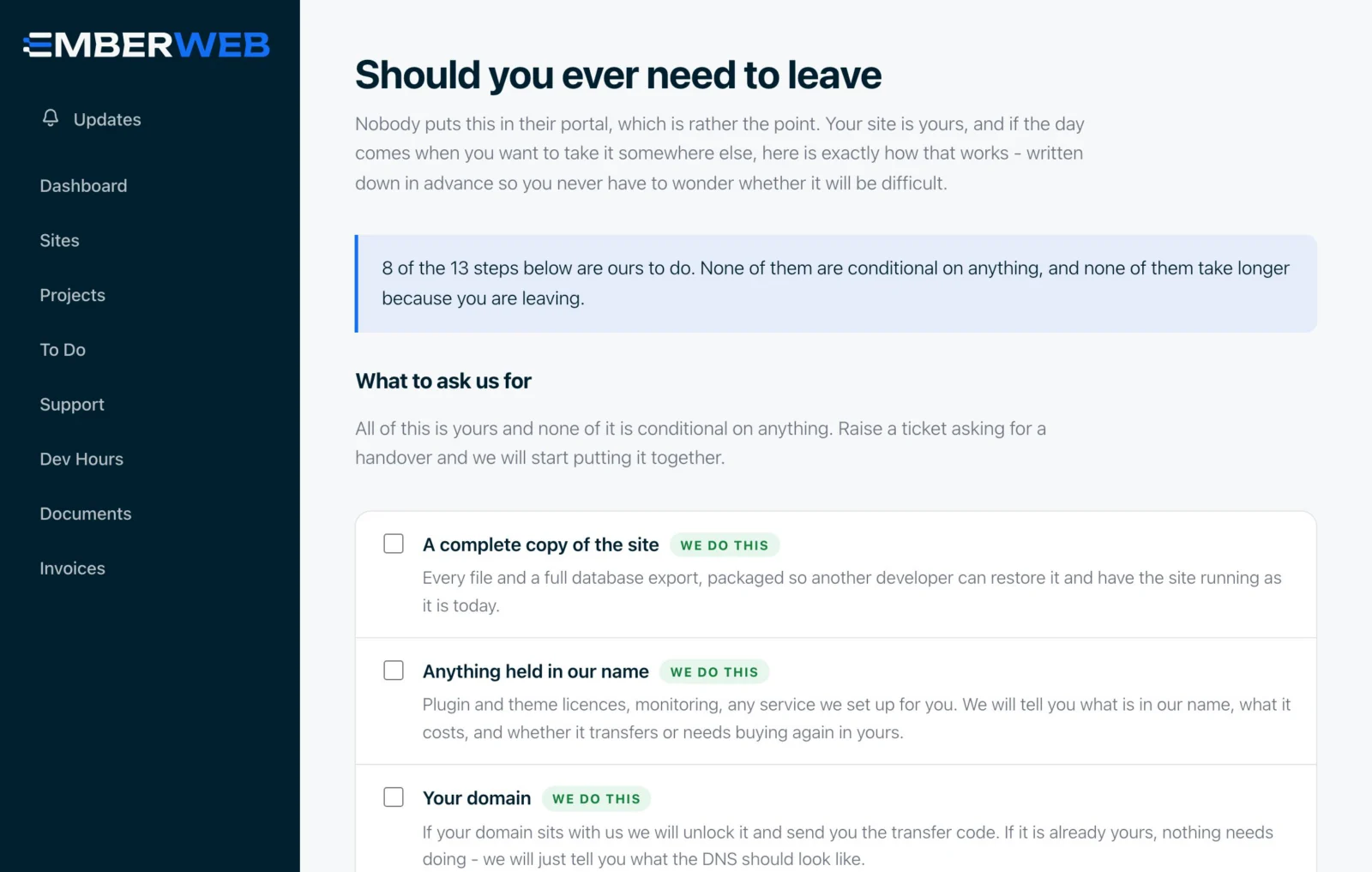
Most agencies make leaving hard. We put the whole process in the portal: a step-by-step checklist of what we hand over and what you will need to do, so you are never held hostage by your own website.

  • A complete copy of your site
  • Anything held in our name, moved to yours
  • Your domain, credentials and a written handover
  • Keep your reports and support history

No. Every Ember Web support plan includes a portal account for your company, with no setup fee and no limit on how often you use it.

Yes. Book a free consultation and we will walk you through the portal on a call, using a demo account so you can see every screen before you commit to anything.

Yes. Invite as many people as you like and choose what each of them can see. For example, a marketing colleague can raise support tickets without seeing your invoices.

Every page and file is checked against your company before it is shown, documents are stored outside the public web, and card payments are handled by Stripe, so we never see or store your card details.

The portal includes a leaving checklist that sets out exactly what we hand over, including a complete copy of your site. You can take your reports and support history with you.

Once a month for every site on a support plan. You get a notification in the portal as soon as it is ready, and your dev hours match the same calendar month.

See the portal for yourself.

Book a free consultation and we will walk you through it, then help you pick the support plan that fits your website. Every plan comes with a portal account from day one.